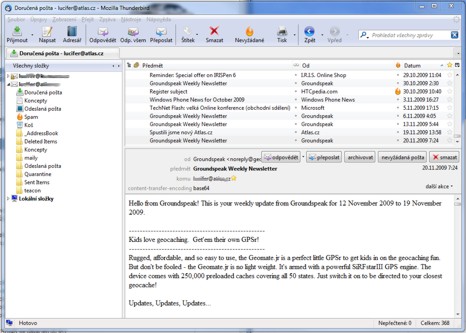
Thunderbird - Mozilla Thunderbird
Mozilla Thunderbird 142.0 delivers professional email management through an open-source desktop client that prioritizes user control and privacy over cloud dependency. This Mozilla Thunderbird application handles multiple email accounts through unified inbox management while storing messages locally for offline access and faster searching.
Core Email Management Features
Multi-Account Configuration
The Thunderbird email client supports unlimited IMAP, SMTP, and POP3 accounts within a single interface. Account setup handles Gmail, Outlook, Yahoo, and custom domains through automated server detection. The unified inbox aggregates messages from all accounts while maintaining separate folder structures for organization.
Configuration supports multiple SMTP servers for different sending identities. Users can assign specific outgoing servers to each email address, ensuring replies originate from the correct domain. This proves essential for professionals managing business and personal correspondence.
Advanced Filtering and Organization
Server-side and client-side filtering rules automate message sorting based on sender patterns, subject keywords, or attachment types. The tabbed interface opens multiple messages simultaneously, functioning like browser tabs for email workflow. Drag-and-drop organization moves messages between folders and accounts without menu navigation.
Conversation view threads related messages chronologically, similar to Gmail's approach but with local storage benefits. The global search indexes message content, attachments, and metadata for instant retrieval across all accounts and folders.
Security and Privacy Capabilities
Built-in Encryption Support
OpenPGP encryption integrates natively without requiring external plugins. Users can generate key pairs directly within the client and encrypt individual messages or entire conversations. This communication software handles encrypted attachments and digital signatures for message authentication.
Spam detection uses Bayesian filtering with manual training capabilities. The system learns from user corrections, improving accuracy over time without sending data to external servers.
Local Storage Benefits
Unlike web-based alternatives, this free email software stores messages on your local drive. This approach provides complete control over personal data while enabling offline access to entire email archives. No vendor can revoke access or modify terms without user consent.
The open source licensing ensures transparency in security implementations. Users can examine source code or compile custom builds without proprietary restrictions.
Cross-Platform Compatibility
Operating System Support
Windows compatibility extends from Windows 7 through Windows 11, with consistent feature parity across versions. macOS and Linux builds maintain identical functionality, allowing smooth transitions between operating systems.
Installation packages include all dependencies without requiring separate runtime downloads. The application updates automatically while preserving custom configurations and message archives.
Integration and Extensibility
Calendar and RSS Features
Calendar integration through Lightning functionality handles appointments, meetings, and task management alongside email workflows. RSS feed aggregation displays news sources within the same tabbed interface used for messages.
Address book synchronization works with CardDAV servers and imports from CSV, LDIF formats. Contact management integrates with message composition for auto-completion and distribution list creation.
Extension Ecosystem
Third-party extensions expand functionality beyond core features. ImportExportTools NG enables folder backup as EML or MBOX files. Additional extensions provide enhanced themes, productivity tools, and specialized protocol support.
Performance and Resource Usage
Memory consumption remains reasonable during normal operation but increases substantially during full account synchronization. Large IMAP folders (50,000+ messages) may experience slower loading times compared to web clients with server-side processing.
Database maintenance through built-in repair tools prevents corruption in long-term installations. Regular compacting of message folders maintains optimal performance as archives grow.
The email client download provides thorough functionality for users requiring local email control without subscription fees or cloud dependencies. For detailed setup procedures across different operating systems, consult our platform-specific installation guides.
Compare Mozilla Thunderbird Head-to-Head
More Mozilla Thunderbird Guides
Explore Internet & Communication
Browse all internet & communication on BigForkSteering. Also see Open Source software and Windows / macOS options.